A blog (an abridgment of the term web log) is a website, usually maintained by an individual, with regular entries of commentary, descriptions of events, or other material such as graphics or video. Entries are commonly displayed in reverse chronological order. "Blog" can also be used as a verb, meaning to maintain or add content to a blog (From Wikipedia).
Watch this video - Video: Blogs in Plain English - a great introduction from Common Craft.
You can setup your very own personal blog to begin recording your thoughts, discoveries and notes in. Blogger and WordPress are examples of popular free online blog hosting services - both extremely easy to use. In the the exercises we use Blogger, but that is only a recommendation. If there is another blog hosting site that you are more comfortable with, please feel free to use it. If you are familiar with Blogger, you can also try out WordPress.
Creating a blog using Blogger takes just three steps:
Discovery Exercise:
Use for or by Medical Libraries & Librarians (examples):
Watch this video - Video: Blogs in Plain English - a great introduction from Common Craft.
You can setup your very own personal blog to begin recording your thoughts, discoveries and notes in. Blogger and WordPress are examples of popular free online blog hosting services - both extremely easy to use. In the the exercises we use Blogger, but that is only a recommendation. If there is another blog hosting site that you are more comfortable with, please feel free to use it. If you are familiar with Blogger, you can also try out WordPress.
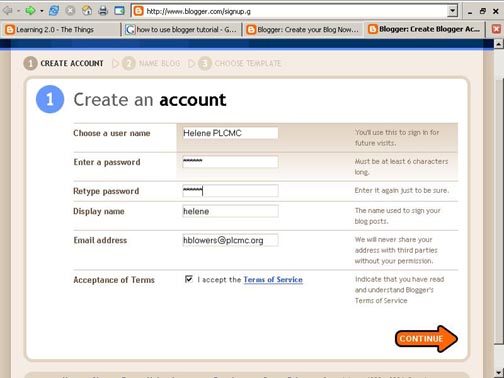
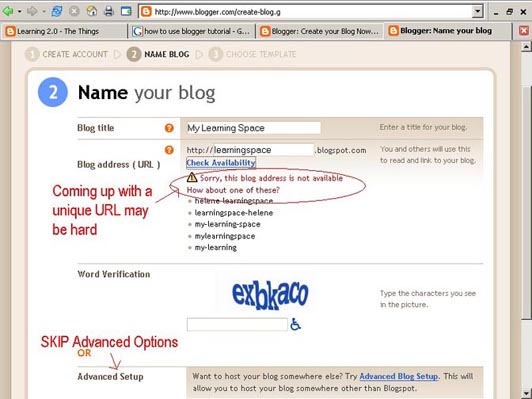
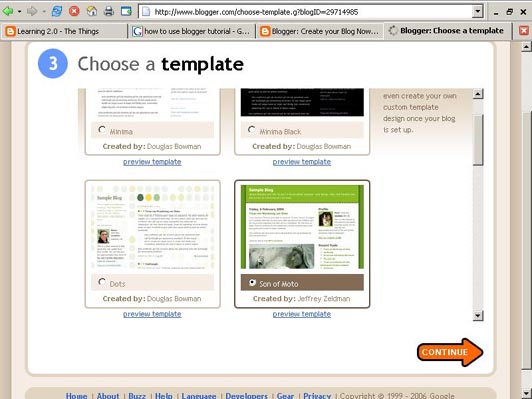
Creating a blog using Blogger takes just three steps:
- Create an account (view screenshot)
- Name your blog (view screenshot)
- Select your template (view screenshot).
- To add posts: You will need to sign into Blogger each time you want to add, edit or configure your blog. Be sure to write down your login and password.
- To view your blog: Your blog address is http://(xxxx).blogspot.com, (xxxx)=the unique identifier you entered in Step 2. Be sure to also write down your blog address.
- Remember that the whole web world can see your blog title and blog address, so you probably don’t want to use your real name. Consider creating a blog name that’s anonymous, yet uniquely you.
- It's a good idea to get a small notebook in which to write all the usernames and passwords that you will have to create during this program. All of the tools that we will play with will require you to create an account. Unless you can find a way to use the same sign in information over and over, you will want to have a place to keep all this information together.
- Bookmark your blog for easy access throughout the workshop.
- About blogs and using Blogger with Blogger’s Quick Tutorial
- Learn more about WordPress Get Started with WordPress.com
- Find tutorials or instruction videos on YouTube.
Discovery Exercise:
- Write a comment to this blog (the "Web technologies for libraries"-blog)
- Setup a blog for yourself through Blogger, (use your gmail account)
- Add a test post or two
- Customise the blog, add photos, gadgets and other stuff
- Embed documents/presentations in a blog post
- More exercices: Set up a blog in WordPress, and do some of the same stuff
Use for or by Medical Libraries & Librarians (examples):
- Overview of Medical Lib Blogs
- David Rothman: http://davidrothman.net
- Krafty: http://kraftylibrarian.com/
- Library Content Management Systems: http://www.libsuccess.org/index.php?title=Content_Management_Systems_(CMS)

No comments:
Post a Comment